


GettingOut Visits
3.312.12K Reviews
App Specs
- Version
- 5.0.0
- Updated On
- License
- Free
- Downloads
- 1,000,000+
- Developer
- Viapath
- Categories
- Communication
- Platform
- Android, iOS
Screenshots
 Analysis by AppCompare
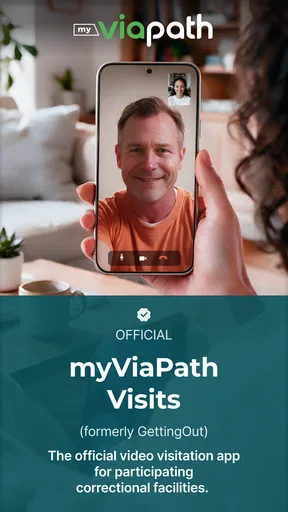
For families and friends with someone in a correctional facility, staying in touch can depend on more than finding a convenient time to talk. The connection also needs to work when the visit begins, and a phone call or ordinary video-chat app may not be an option. GettingOut Visits is a communication app from Viapath built around video visits at participating facilities. I see its value in that specific role: it gives visitors a place to arrange and join a remote conversation, rather than trying to replace every way people keep in touch.
When the network becomes part of the visit
A video visit relies on a working internet connection at both ends, so connectivity is part of the experience rather than a minor technical detail. A strong connection can make it easier to follow expressions and conversation; an unstable one may interrupt the flow just when a family member is trying to share something important. The app’s store summary says video visits are available at select facilities, which is an important practical boundary: the service is not automatically a fit for every institution.
I’d treat a scheduled visit like an appointment that deserves a little preparation. Before the time slot, I would connect to dependable Wi-Fi or check that mobile service is steady, close other bandwidth-heavy activities, and make sure the phone has enough battery. Those are ordinary video-call precautions, but here they can help avoid wasting a limited opportunity. If the network is unreliable at home, moving closer to the router or choosing a location with better reception may be more useful than repeatedly changing app settings.
Planning around a phone and a real day
The mobile format is convenient when a visitor cannot easily travel, but it still asks for a quiet stretch of attention. A video conversation is harder to manage while walking, commuting, or juggling errands than a quick text. I’d set aside a calm place, prop the phone at eye level, and keep the charger within reach. That small setup makes it easier to focus on the person on screen instead of the device.
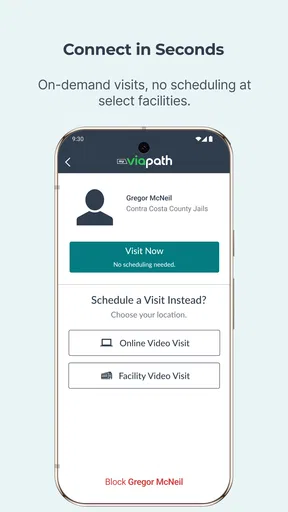
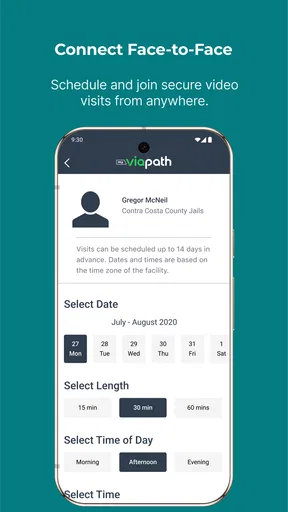
A realistic example is a relative who has a work break in the afternoon and needs to coordinate with other family responsibilities. Checking the available visit times and planning around one that fits can make the conversation possible without a trip to the facility. The useful trade-off is that a remote visit saves travel, but the visitor still needs a suitable place and a reliable connection at the appointed time. If the room is noisy or the phone is being passed around, the convenience can quickly become frustrating.
What to do when a call falters
Connection problems are especially stressful when everyone has made time for a visit. If video or audio becomes unstable, I would first check whether the phone has switched networks or lost signal, then move to a steadier connection if one is available. Avoiding several quick network changes during the call may help keep the device from struggling to reconnect. If the app itself is slow, closing other open apps and reopening it can be a sensible first step, though it is no guarantee that a weak connection will improve.
It also helps to distinguish a local phone problem from a service or facility issue. If the app will not load, note what happened and when, then use the in-app help or support route when available. If a visit cannot proceed, contacting support is more constructive than repeatedly tapping the same controls. Because visits depend on facility participation and scheduling, I would not assume that an unsuccessful connection can always be replaced immediately; planning a backup way to communicate, where permitted, is a more realistic approach.
Worth Reading Before You Choose

EA SPORTS FC Mobile 26 Is a Bigger Football Game, but It Takes Time

Flipboard Shows What News Apps Must Do Beyond the Feed

Switching to Android Auto Means Rethinking Your Driving Routine

Google Calendar Makes a Crowded Week Easier to Manage

Ludo King Makes the Most of the Minutes Between Plans

Baby Panda World Brings Quick Play to Modern Phones, but Its Game Library Feels Busy
Using mobile data thoughtfully
Video can consume a meaningful amount of mobile data compared with text, so visitors who do not have generous data service may want to use Wi-Fi for a planned call. I would check the phone’s own data-use settings before relying on cellular service, especially if several family members share a plan. The app’s text messaging option, described in the published article below, can be more practical for a short update when a video conversation is unnecessary, although the best choice depends on what communication options are available for the person and facility.
There is a human side to that choice too. A video call is valuable when seeing one another matters, while a short written message may suit a simple reminder or a quick expression of support. I would save the video slot for the conversation that benefits from face-to-face interaction rather than treating it as the default for every small exchange. That approach can make better use of both the scheduled time and the visitor’s connection.
Who will find it useful—and who may not
This is most relevant to people who already know that their loved one’s facility supports the service and who need a remote way to maintain contact. It may suit relatives who live far away, visitors with limited transport, or anyone coordinating a conversation around work and caregiving. It is less suitable for someone looking for a general-purpose video messenger to call friends anywhere, or for someone whose intended facility does not participate. In those cases, an ordinary calling app or the facility’s own approved communication options may be the better starting point.
Compared with familiar messaging and video-chat apps, the key difference is the setting: this app is intended for facility visits, not casual calls across a personal contact list. That specialization can be useful when ordinary alternatives do not serve the purpose, but it also means visitors should check facility availability and scheduling before building plans around it. The experience is shaped not only by the visitor’s phone but also by the connection and arrangements on the other side.
What the app’s overall profile tells me
As a free communication app for everyone, it is accessible to a broad range of visitors, and its current version is 4.2.0. It has an average rating of 3.3 from around 28,000 ratings, with about 12,000 written reviews and over 1 million installs. I read that as a sign of a widely used service with mixed experiences, rather than a guarantee that every visit will be effortless. Viapath released it on September 21, 2017, and it runs on Android 7.0 or later.
Those figures matter less to me than whether the app fits a visitor’s actual situation. A lower or mixed average can reflect the pressure of using a communication tool in a setting where timing, facility access, and connectivity all matter. I would judge it by whether the relevant facility supports it, whether the visitor can reliably get online, and whether the available visit arrangements match the family’s needs.
If you are deciding whether to install it, first establish that your facility participates and then consider how you will connect during a scheduled visit. A phone with a stable network, a quiet spot, and enough battery gives the experience a fair chance. If those conditions are hard to arrange, or if you need unrestricted calls with people outside the facility system, a different communication method will likely suit you better.
For people who need this particular kind of contact, the app has a clear purpose: it brings remote facility visits onto a phone. The connection can still be the weak point, and the facility-specific nature makes it less flexible than ordinary video chat. But when participation, scheduling, and internet access line up, it can make a meaningful conversation easier to fit into everyday life.
Setting Up and First Impressions
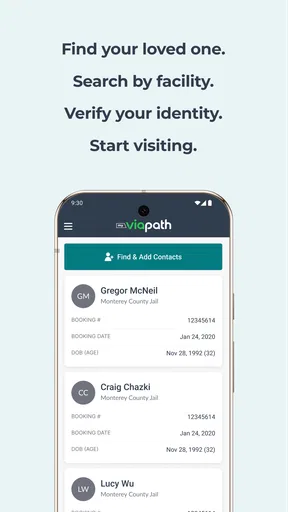
Getting started with the GettingOut Visits app is pretty straightforward. You’ll first need to download it from your device’s app store—available on both Android and iOS. Once you’ve got it installed, the setup process involves creating an account or logging in if you already have one. The app guides you through this with on-screen prompts that are quite intuitive. I have to say, the user interface is clean and simple, which is always a plus in my book.
Once you're in, the app offers you a demo of how to schedule visits. I found this feature particularly helpful, as it walks you through the steps without feeling overwhelming. It’s like having a little digital assistant guiding you along the way. Now, isn't that convenient?
Features That Stand Out
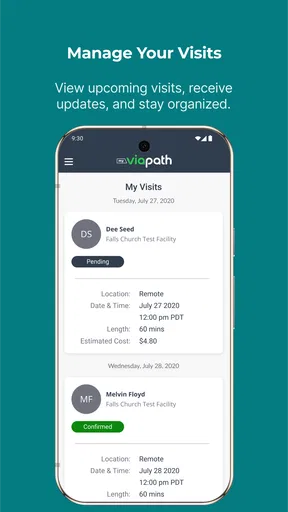
One of the most impressive aspects of the app is its scheduling feature. The app allows you to view available time slots for visits, making it easy to plan your day around them. You can book, reschedule, or cancel visits with just a few taps. It’s like having a personal appointment manager right in your pocket.
Another noteworthy feature is the video quality. We all know how frustrating it can be when video calls are choppy or pixelated. Fortunately, the app provides decent video quality, ensuring that you can see and hear your loved one without too many hiccups. Of course, this somewhat depends on your internet connection, but the app does a good job of maintaining a stable call.
The app also includes a messaging feature, which allows you to send and receive texts. This is super handy for those quick messages when a video call isn’t necessary. Plus, everything is encrypted, so you know your conversations are secure. Peace of mind, anyone?
User Experience: The Good, The Bad, and The Ugly
Let’s talk about what it’s like to actually use the app on a day-to-day basis. The interface is mostly user-friendly, but like any app, it has its quirks. Sometimes, the app can be a bit slow when loading or switching between features, which can be a tad frustrating. However, once you get past these minor hiccups, the overall experience is smooth.
Customer support is another area where the app shines. If you run into any issues, there’s a help section packed with FAQs, and you can contact support directly from the app. In my experience, they were pretty responsive, so kudos for that!
Security and Privacy
Security is paramount, especially when dealing with sensitive situations like these. The app uses encryption to protect your data, which is reassuring. You also have the option to set up a PIN for added security whenever you open the app. It’s little touches like these that make a big difference in user confidence.
Moreover, the app complies with various privacy regulations, which is a must-have in today’s digital world. Knowing that your personal information is safe and sound is certainly a relief.
Final Thoughts
All in all, the app is a solid choice for anyone needing to maintain contact with someone in a correctional facility. Its ease of use, coupled with strong security features, make it a reliable tool for those tough times. Sure, it has its minor flaws, but don’t we all?
So, if you’re looking for an app that bridges the gap, this one certainly does the job. Whether it’s scheduling video calls or sending quick messages, it makes staying connected hassle-free. And in the end, isn’t that what really counts?
Pros
- User-friendly interface for easy navigation.
- Real-time updates on visitation schedules.
- Secure messaging for private communication.
- Multi-platform support for Android and iOS.
- Efficient customer support available.
Cons
- Requires stable internet for optimal use.
- Limited features in the free version.
- Occasional login issues reported.
- Some users find notification setup tricky.
- Security concerns with sensitive data handling.
FAQs for GettingOut Visits
What is GettingOut Visits and how does it work?
GettingOut Visits is an application designed to facilitate video visitation with inmates at participating correctional facilities. Users can schedule visits, send messages, and manage their visitation calendar through the app. It requires users to create an account and link it to the appropriate facility for seamless communication.
Is GettingOut Visits free to use?
While the app itself is free to download, certain features such as video visitation may incur charges. Fees vary depending on the facility's policies and the type of service you choose. Always check for specific costs associated with each service before proceeding to avoid unexpected charges.
What devices are compatible with GettingOut Visits?
GettingOut Visits is available on both Android and iOS platforms. To ensure optimal performance, it is recommended that your device runs on the latest operating system updates. Check the app's compatibility requirements in the Google Play Store or Apple App Store before downloading.
How secure is my data on GettingOut Visits?
The app uses encryption and other security measures to protect your personal information. However, it's important to use strong passwords and avoid sharing your login details. Always review the app's privacy policy to understand how your data is collected and used.
Can I use GettingOut Visits internationally?
Video visitation typically requires a stable internet connection, and international users can access the app if they meet this requirement. However, it's crucial to verify whether the facility supports international calls and if additional charges apply. Check with the facility for any restrictions or requirements.


